4 Tips to Improve Mobile App Performance and User Experience

Mobile apps are now a major interface between businesses and users. Whether it is shopping, banking, learning, or entertainment, users expect mobile apps to provide a seamless experience every time they use it.
If a mobile app is slow, crashes frequently, or is hard to use, users tend to lose interest quickly and shift to other options. In a highly competitive mobile app market, a mobile app's performance is a major factor that can affect user retention.
This is why businesses increasingly invest in a professional mobile application development service that focuses on both performance and usability. In this article, we’ll explore four practical tips that can help improve mobile app performance while delivering a better user experience.
What is Mobile App Performance?
Mobile Application Performance refers to how well an application performs on a mobile device. Mobile Application Performance involves various aspects such as:
-
Speed- How long does it take from the time you press the application until it opens up, and how fast you get responses after pressing buttons inside the application.
-
Responsiveness- How smoothly you can scroll and click inside the application.
-
Resource efficiency- How efficiently the application is using battery power, memory, and other network resources.
If an application has good performance, then it means that the application runs smoothly and does not use any extra resources from the device.
What is User Experience (UX) in Mobile Apps?
User Experience (UX) on the other hand, focuses on how users feel while interacting with the app. It includes elements such as:
-
The ease of navigation so that users could access the features within the application.
-
The ease of the interface design that the users could understand without putting in too much of an effort.
-
The accessibility of the application so that it could be used by various types of users.
-
Overall satisfaction with the experience while using an application.
In reality, performance and UX are related. A well-designed app may be a failure if its performance is poor, and a well-performing app may be a failure if its design is poor. A successful app for mobile devices is a balance between performance and design.
Why Mobile App Performance and UX Matter
Mobile app performance and user experience play a major role in determining whether an app succeeds or fails. When an app is fast, stable, and easy to use, users are more likely to continue using it and recommend it to others.
User Retention
Users will be dissatisfied with a mobile application that takes a long time to load, crashes, and consumes a lot of battery. A good experience will ensure that users will be motivated to retain the application.
App Store Ratings
Performance-related issues may result in a low rating of the application in the app store. A low rating may make users less motivated to install the application.
User Engagement
When an app is performing well, users tend to engage more with the app’s features, thus increasing the engagement period.
Brand Reputation
When an app is performing well, users tend to have a positive perception of the brand. A well-performing app is often associated with a professional and reliable brand.
Business Growth
A well-performing app is likely to increase conversions and sales, thus promoting customer loyalty.
Key Strategies to Improve Mobile App Performance and UX
Improving performance doesn’t require complex changes. By applying a few proven strategies, you can improve mobile app speed and provide a better user experience.
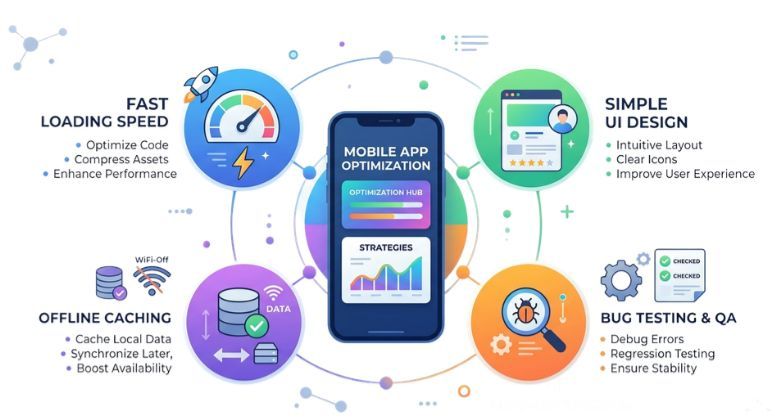
Optimize App Loading Speed
The loading speed is one of the first things that users notice when they open an app. Even if there is a small delay, users can get frustrated and might exit the app before they get to explore all that it has to offer. This is why fast apps give users a good first impression.
Ways to improve loading speed include:
-
By compressing images as well as media files, you can reduce their size while keeping their quality intact, which will help improve your loading speeds.
-
By removing unnecessary API calls, you are able to reduce the number of times your application requests data from your server.
-
Implement lazy loading to load heavy content such as images or videos only when needed.
-
Write optimized and efficient code to ensure smoother performance across devices.
Improving loading speeds, you can provide a better overall experience for your users and keep them engaged with your application.
Simplify Navigation and UI Design
A complicated interface may confuse users and make it difficult for them to perform tasks. Simple and intuitive navigation is crucial for a good user experience.
The best practices include:
-
The interface should be simple and organized, so that users can easily locate important features.
-
Use a consistent design (colour, icon, layout) throughout the application so that users will be able to locate what they need quickly.
-
Create buttons and calls to action that clearly identify what the user should do next.
-
Ensure touch-friendly elements that allow for easy tapping on mobile devices.
A simple interface will help users navigate through the application smoothly and make it easy for them to carry out tasks.
Regular Testing and Bug Fixing
Bugs, crashes, and glitches can have a negative impact on the app's performance and user trust. Testing can prevent these problems and ensure that the app continues to run smoothly.
Developers should focus on:
-
Functionally testing, in order to ensure that all functions in the app are working correctly.
-
Performance testing, in order to have an opportunity to measure speed, resources, and how fast it can respond.
-
Tracking error reports and crash logs in case there are any technical problems.
-
Testing on different devices and platforms, in order to ensure that they are compatible.
-
Collecting user feedback on problems that exist in the real world.
Continuous testing and updates help maintain stability and improve the overall user experience.
Implement Offline Mode and Smart Caching
Mobile users may not always have access to a stable internet connection. Providing limited functionality offline can greatly improve usability.
The following strategies can be employed:
-
Storing frequently accessed data in local storage. This enables users to have access even when they are not connected to the internet.
-
Cache data that has already been loaded to minimize repeated requests for data from the server.
-
Loading data can be improved by retrieving stored data instead of loading it again from the server.
-** Data can be synchronized** once the device is connected again to the internet.
These strategies can be employed to develop a more reliable mobile application.
Future Trends in Mobile App UX
Mobile app technology is evolving quickly, and several emerging trends are shaping the future of user experience.
AI-Powered Personalization
Artificial intelligence assists apps in understanding user interactions and provides personalized recommendations. Apps like Netflix and Spotify use AI to suggest relevant content and improve engagement.
Voice Interface Integration
The integration of voice interfaces with the help of Google Assistant and Alexa enables users to use voice interfaces for interacting with the app.
Augmented Reality (AR) and Virtual Reality (VR)
Augmented Reality and Virtual Reality are immersive technologies. For example, users can use the IKEA Place app to see how the furniture would look in their home before purchasing it.
Rise of Super Apps
A super app is an application that provides users with access to more than one service. A good example of a super app is WeChat.
5G-Powered Mobile Experiences
The advancement in 5G technology will enable mobile apps to offer users a smooth experience in terms of app loading, streaming, and other real-time app experiences.
To know how 5G is transforming real-time app development, check out this article: How 5G Is Changing Real-Time App Development
Conclusion
Building and maintaining a custom-built and friendly mobile app may not be an easy task, particularly when considering the app’s performance and the user experience. Partnering with experienced professionals may help simplify the task.
By focusing on faster loading speeds, simplicity of use, regular testing, and intelligent caching strategies, mobile apps will be able to perform better and keep users engaged for longer.
Heimatverse offers custom mobile app development services that focus on building high-performance, intuitive, and visually appealing mobile applications designed to succeed in today’s competitive digital landscape.
Frequently Asked Questions (FAQS)
1. How to improve mobile app performance?
You can improve mobile app performance by focusing on mobile app performance optimization techniques such as optimizing code, compressing images, reducing API calls, and implementing caching. Regular testing on different devices also helps identify and fix performance issues.
2. How can you optimize the performance of a mobile application?
To improve mobile app speed, reduce app load time, limit background processes, and optimize database queries. Efficient memory management and faster data loading techniques also help deliver a smoother user experience.
3. What are the 7 stages of app development?
The seven phases of mobile application development generally include idea and planning, market analysis, UI/UX design, application development, testing, deploying the application through the Google Play Store and Apple App Store, and maintenance.
4. How to optimize image assets for faster loading in mobile applications?
To optimize mobile apps, use image compression, modern formats like WebP, lazy loading, and properly sized images. These techniques reduce load time and improve overall app performance.
5. Why is mobile app performance important for user experience?
Mobile app performance directly impacts user experience. Faster apps provide smooth navigation, lower bounce rates, and higher engagement, making users more likely to stay and interact with your app.
“Fulfilled direction use continual set him propriety continued.”
Was this article helpful?
25 out of 78 found this helpful